5. Network privacy and traffic control
What your connections reveal
The shape of a connection
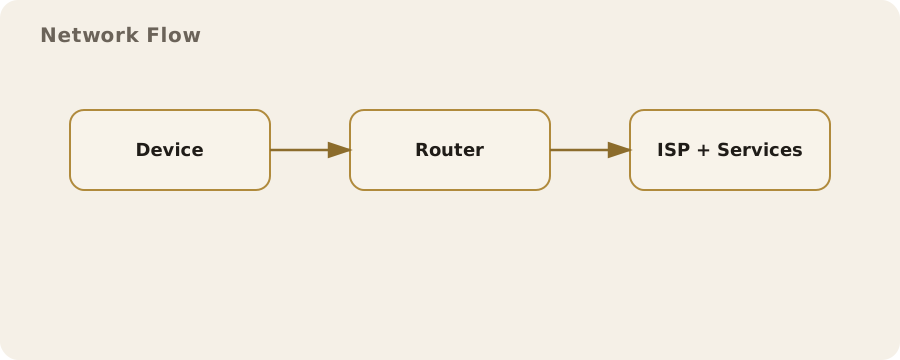
Every time a phone or computer goes online it creates a trail of network activity. Even when the content of a message is encrypted, the connection itself still has shape: which service was contacted, when, for how long, and how much data moved. That surrounding information is often called metadata. It is not a magical mirror of your inner life, but it is specific enough to expose habits and routines when patterns repeat.
A simple example is a train commuter checking the same news site each morning at 07:30 from a particular area of Leeds. A network operator can see the timing and destination even if the articles are read over HTTPS, and they can infer routine without reading a word. This is not a conspiracy; it is the normal operation of networks, which are built to route traffic efficiently by knowing where it should go.
IP addresses, location, and identification
The internet is addressed by IP numbers, and every outbound connection needs one. Most home broadband lines and mobile networks in the UK assign addresses dynamically. That means the address can change, but the provider still keeps internal records linking it to an account for billing and operational reasons. From the outside, an IP address is often enough to identify the internet provider and the rough geographic area. It rarely points to a precise street address, but it can narrow a location to a city or part of a city, and it can reliably identify a household network over time if the address stays stable.
It is a common myth that having a changing IP makes you anonymous. It helps a little, but many services also use device identifiers, login details, and behavioural fingerprints, and the network itself logs the mapping between account and address. Another common misunderstanding is that a private home address is visible everywhere. Inside the home, devices use private addresses that are not visible on the wider internet; a router performs network address translation so the outside world sees only the single public address. That simplifies security, but it does not make the household invisible.
DNS as the internet’s address book
Before a device can connect to a website, it usually asks a Domain Name System (DNS) server to translate a human-readable name into an IP address. That request is often a clear indicator of intent. If a phone queries the DNS record for a health clinic, it reveals interest even before a web page is loaded. Many UK networks operate their own DNS servers and log these requests for performance, security, and regulatory compliance.
Traditional DNS is not encrypted, so it can be observed by the network. Modern options such as DNS over HTTPS (DoH) or DNS over TLS (DoT) encrypt the request, which makes casual observation harder. They do not, however, hide the destination once the connection is made, and they shift trust to the chosen DNS provider. A provider can still see which domains you request; the difference is who gets that visibility.
Traffic control in everyday networks
Network operators manage traffic to keep services stable. On a busy mobile mast, certain types of traffic may be prioritised so that calls and video meetings remain usable. Home broadband providers may throttle specific protocols during peak hours to reduce congestion. This is often described as traffic management rather than censorship, and in the UK it is governed by regulator guidance and consumer protection rules.
The same tools can be used in other ways. Some workplaces block streaming sites to reduce bandwidth usage; schools may filter content to meet safeguarding requirements. These controls are applied at the network level and can affect everyone using the connection, regardless of what their devices are capable of. They are not always precise, and they can mistakenly block legitimate content, particularly when automated filters are used.
Encryption: what it protects and what it does not
Most web traffic now uses HTTPS, which encrypts the content between your device and the service. That protects the text of a message and the details of a transaction from people who can see the network. It also protects you against certain types of tampering, such as a third party inserting adverts or altering downloads in transit.
HTTPS does not hide everything. The destination domain is often visible through the Server Name Indication (SNI) in the TLS handshake, and the IP address is always visible to route the traffic. Newer standards such as Encrypted ClientHello (ECH) aim to hide SNI, but support is not yet universal. Even with ECH, traffic patterns remain, and observers can still make inferences about activity based on timing and volume.
Virtual private networks in practice
A virtual private network (VPN) creates an encrypted tunnel from your device to a VPN server. To the local network, all traffic looks like it is going to that server rather than to each individual site. This can reduce visibility for Wi‑Fi providers, ISPs, and anyone monitoring the local connection. It also changes the apparent source of your traffic, which is why people use VPNs to reach region-restricted streaming services or to protect their browsing on public Wi‑Fi in cafés and trains.
The trade-off is that the VPN provider becomes the point of visibility. A reputable provider can reduce the risk by running minimal logging, being transparent about ownership, and offering independent audits, but the fundamental shift is that you are moving trust rather than eliminating it. Another practical limitation is performance: routing through a distant server can increase latency, which matters for video calls and online games.
A common myth is that a VPN makes you anonymous. It does not. If you log into an account, or if a website uses cookies and browser fingerprinting, the site can still recognise you. A VPN protects the path, not the identity you give away.
Proxies, Tor, and layered routing
A proxy server forwards traffic on your behalf, but it does not necessarily encrypt it. Corporate environments often use proxies to scan for malware or enforce policy. It is easy to confuse proxies with VPNs, but they operate at different layers and provide different guarantees. A proxy may still expose traffic to the local network, depending on how it is configured.
The Tor network routes traffic through multiple volunteer-operated relays, each only knowing the previous and next hop. This design reduces the ability of any single observer to link a user to a destination. Tor is effective for certain privacy goals but has clear limitations: it can be slow, some services block Tor exit nodes, and it does not hide what you do within a service once you log in. Using Tor may also draw attention in environments where its use is unusual, which is a practical risk rather than a technical one.
Mobile networks and always-on signalling
Mobile phones maintain a continuous relationship with the network so that calls and messages can be delivered. That relationship involves constant signalling, even when no data is actively being used. The network keeps track of which cell a device is connected to, and that information can be used to approximate location. It is part of how the system functions, and it is also the basis for location-based services and lawful access under UK frameworks.
A practical example is a delivery driver using a route-planning app. The device exchanges location data with the app provider, while the mobile network records which masts the device is using. Both can reveal movement, but they are held by different parties and governed by different rules. Turning off mobile data does not stop signalling; only powering the phone off or using airplane mode stops it.
Wi‑Fi realities: hotspots and shared networks
Public Wi‑Fi is convenient, but it is also shared. A café or hotel can see connected devices and may log which websites are accessed, depending on their equipment. Modern web encryption limits what they can read, but basic metadata remains. A busy train’s Wi‑Fi provider might use traffic shaping to keep video streaming from overwhelming the connection, which is why a video works at home but buffers on a commute.
Risk management here is about context. For routine browsing, a public network is usually fine if the sites you use are encrypted. For sensitive work or account management, using a VPN or waiting until you are on a trusted network reduces exposure. It is also sensible to disable automatic Wi‑Fi connection so a device does not join a similarly named hotspot by mistake.
Device and browser fingerprints
Even if network identifiers are hidden, websites can still recognise a device by its configuration. A browser reveals details such as installed fonts, screen size, supported features, and time zone. Combined, these can create a fingerprint that is often stable enough to track repeat visits. This is not limited to advertising; it is also used for fraud prevention and account security.
The mitigation is imperfect. Privacy-focused browsers reduce fingerprinting by limiting exposed details or standardising them across users. Blocking third-party scripts helps, but some services rely on those scripts for legitimate functions. The trade-off is occasional breakage, such as payment pages that refuse to load or security checks that take longer.
Traffic analysis and inference
Traffic analysis is the practice of learning from patterns rather than content. If a device uploads a large amount of data at 18:00 every weekday, it may indicate a backup routine. A spike in traffic to a video conferencing service may suggest a meeting, even if the conversation is encrypted. These are inferences, not certainties, but they can still be useful to advertisers, employers, or investigators.
This risk cannot be eliminated, only managed. Spreading activity across time, avoiding unnecessary background uploads, and using tools that batch or compress data can reduce the clarity of patterns. At the same time, these changes often trade convenience for privacy. Automatic photo backups are helpful precisely because they are automatic; turning them off for privacy means accepting the manual effort and the risk of losing data.
Monitoring in workplaces and schools
Many UK workplaces monitor their networks for security, compliance, and productivity. Schools and universities often filter content to comply with safeguarding obligations. The extent of monitoring varies widely. Some organisations log only aggregate traffic volume; others inspect connections more closely, sometimes using deep packet inspection on unencrypted traffic.
The key practical point is that the network owner sets the rules. Using a personal VPN on a corporate network may violate policy, and on some networks it will be blocked. If you are on an employer-managed device, it may have endpoint monitoring that observes activity regardless of the network. That is a different layer of control, and it changes what network privacy measures can achieve.
Balancing privacy, functionality, and trust
Network privacy is not a single switch; it is a set of choices about which parties you trust and what trade-offs you accept. Encrypting DNS shifts visibility from the local network to a DNS provider. Using a VPN hides traffic from your ISP but exposes it to the VPN operator. Tor reduces the ability to link you to a destination but makes browsing slower and can limit access to some services.
A practical approach is to match the tool to the situation. For everyday browsing at home, HTTPS and sensible browser settings may be enough. On public Wi‑Fi, a VPN can be a sensible extra layer. For high-sensitivity research or whistleblowing, layered tools and a careful operational plan may be appropriate, but they also require discipline and an understanding of their limits. No choice is cost-free, and accepting those costs is part of making informed decisions.