2. Identity, authentication and access control

When a system decides whether to let you in, it is making a series of choices about identity, proof and permission. Those choices show up everywhere: unlocking a phone, logging into your email, paying online, entering a workplace, or accessing a medical record. Each step has its own assumptions about who you are, what evidence counts, and what you are allowed to do.
Identity is a claim, not a fact
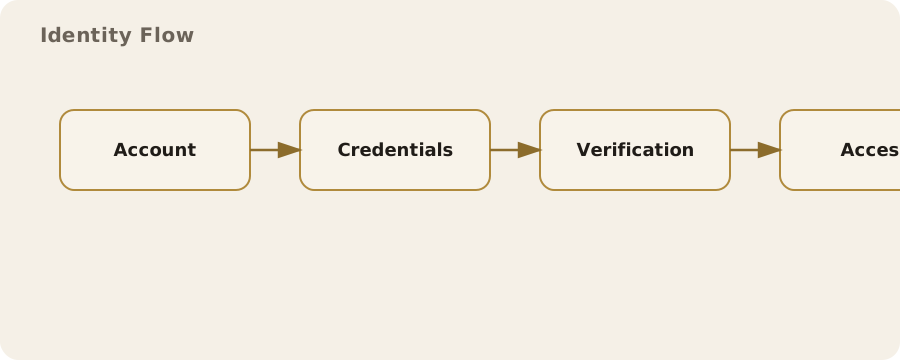
In digital systems, identity is not a true or false statement in the way your date of birth is. It is a claim you make and the system decides whether to accept. When you type an email address and a password, you are claiming to be the account holder. When you scan a badge at work, you are claiming to be the person assigned to that badge. The system does not know you; it checks evidence that usually stands in for you.
People often assume identity in the digital world maps neatly to a real person. In practice, the link is loose. One person may have multiple accounts in the same service, and one account can be shared by several people. In the UK, a library card or an NHS login is tied to a real individual, while a gaming account or a forum handle is usually a pseudonym. That distinction matters because different systems require different levels of proof.
Authentication: proving the claim
Authentication is the process of proving that an identity claim should be accepted. It relies on one or more kinds of evidence. The simplest is something you know, such as a password or a PIN. Something you have is next, such as a security key, a phone receiving a code, or a swipe card. Something you are covers biometrics such as fingerprints or face scans.
Everyday examples show how these factors are mixed. A contactless payment may only require the bank card (something you have) up to a certain limit, but a higher value purchase demands the PIN (something you know). A phone unlocks with a fingerprint, but if it restarts you have to enter the passcode. This is not about catching you out; it is about managing risk by demanding stronger evidence at higher stakes.
Passwords and their limits
Passwords are still the backbone of most systems. They are cheap to implement and familiar, but they are fragile. People reuse them, write them down, or choose ones that are easy to guess. Attackers can automate guessing at scale or use lists of breached passwords. The common myth is that a long, complex password is always safer. Length helps, but uniqueness is just as important. A long password reused across multiple sites is still a single point of failure.
Mitigation for individuals is practical rather than heroic: use a password manager to generate and store unique passwords, and enable an extra factor where possible. Organisations can reduce harm by using rate limits, account lockouts that do not reveal whether a user exists, and login monitoring. These measures do not prevent all compromise, but they lower the odds and the impact.
Two-factor and multi-factor checks
When a system asks for two forms of evidence, it is using multi-factor authentication (MFA). A common example is logging into a bank: you enter a password and then approve a prompt in an app. Done well, this is effective because an attacker must compromise two different channels.
There are weak forms of MFA. Text-message codes can be intercepted through SIM-swap fraud or redirected by an attacker who has convinced a mobile provider to move a number. App-based prompts are stronger, but still vulnerable to push fatigue, where people tap approve without checking. A physical security key is typically more robust because it ties authentication to a specific device and resists phishing by checking the website address. The trade-off is convenience and cost; not everyone will carry a key for daily use.
Biometrics: useful but not magic
Biometrics are often framed as a replacement for passwords, but in practice they are a convenience layer on top. A fingerprint does not travel across the network; it unlocks a local device, which then uses its stored credentials. Biometrics can be excellent for quick access while keeping your long passcode in the background. They also have limits: a face scan may fail with a mask, or a fingerprint may be hard to read after manual work.
The risk is not just that biometrics can be fooled, but that they are hard to change. You can replace a password, but not your face. Good systems store biometric data in a secure enclave on the device and avoid sending it to a remote server. When biometrics are used remotely, such as in some identity verification apps, the risk of data leakage increases. You cannot eliminate that risk entirely; you can only decide whether the convenience is worth it for the service in question.
Access control: deciding what you can do
Authentication answers “who are you?” Access control answers “what are you allowed to do?” This is where permissions, roles and policies live. A streaming service lets you watch content but not change billing details unless you have the account owner role. In a workplace, an employee might access shared files but only a manager can approve expenses. These rules are often invisible, but they define the real boundary of power in a system.
Access control can be coarse or fine-grained. Many consumer apps use a simple model: one account, one set of permissions. Corporate systems are more complex. A hospital may allow a nurse to view a patient record but not edit the diagnosis; a consultant may edit the diagnosis but not export large datasets. This complexity reduces the damage of a single compromised account, but it is harder to manage and prone to mistakes.
Least privilege and its practical limits
The principle of least privilege says each user should have the minimum access needed for their job. It is sensible in theory and difficult in practice. Teams change, projects end, and people move roles. Over time, permissions accumulate. The result is “permission creep”, where accounts keep old access long after it is needed. This is common in large organisations, including UK public sector bodies, because multiple systems do not always share a single source of truth for roles.
Mitigation involves both policy and tooling. Regular access reviews can remove stale permissions, and just-in-time access can grant elevated rights for a limited window. These measures cost time and introduce friction, so they are often applied only to high-risk systems. The trade-off is between operational convenience and the blast radius of a compromised account.
Identity proofing: linking the digital to the real
Sometimes a system needs to link an account to a verified real-world person. This is identity proofing. In the UK, examples include applying for a bank account, accessing certain government services, or passing a right-to-work check. The evidence might be a passport scan, a live video selfie, a credit reference check, or a combination.
People assume these checks are foolproof. They are not. Fake documents exist, and automated checks can be tricked. At the same time, legitimate users can be incorrectly rejected, especially if they have less conventional documentation or their appearance changes. The risk is two-sided: fraud and exclusion. Systems can reduce fraud with layered checks, but they must balance this against the cost of locking out genuine users. Human review can help but does not scale well.
Session management and the quiet mechanics of access
After you log in, a system usually gives you a session, often stored as a cookie in your browser or a token in an app. This is the part most people never see. It is also where many real-world failures happen. If a session is stolen, an attacker can act as you without knowing your password. This can happen through phishing, malware, or stolen devices. It can also happen if a public computer is left logged in.
Mitigations include short session lifetimes for sensitive actions, device recognition, and re-authentication for changes like adding a new payment method. Users can help by logging out of shared devices, using browser profiles, and enabling device lock screens. Some risk remains: convenience relies on session persistence, and that persistence is exactly what makes sessions valuable to attackers.
Single sign-on and its ripple effects
Single sign-on (SSO) lets you use one identity to access multiple services. For a workplace, it reduces password fatigue and simplifies user management. For the individual, it means fewer logins. The downside is that the single identity becomes a single point of failure. A compromised SSO account can unlock multiple systems, sometimes including payroll, customer data and internal messaging.
SSO can also create unexpected visibility. When a service relies on an identity provider, that provider can see when you sign in and often which service you use. In a corporate setting, that visibility is part of governance. In personal use, such as “Sign in with Google”, it is a trade-off between convenience and data sharing. You can reduce the risk by limiting which services are tied to a single provider and keeping the provider account strongly secured with MFA.
Everyday friction and real-world compromises
Not every system needs maximum security. A local news site might accept a simple password reset by email because the stakes are low. A bank will insist on stronger checks because the stakes are high. This is why authentication feels inconsistent. Security is not only about what is possible; it is about what is sensible to demand in context.
People sometimes think “more security” always means “more safety”. In practice, too much friction leads to risky workarounds: shared passwords, unsecured notes, or people opting out of protective features. Good design aims to match the protection to the risk. As a user, you can make similar judgements by focusing your efforts on high-value accounts such as email, banking and cloud storage.
Myths and misunderstandings
Myth: “My password is strong, so my account is safe.” A strong password helps, but it does not protect against phishing, malware, or reuse across services. Security is a chain; the weakest link may not be the password at all.
Myth: “Biometrics are infallible.” They are good at quick local checks, but they can fail or be spoofed. They are also not reversible if compromised. Treat them as a convenience, not as an absolute guarantee.
Myth: “Two-factor means unhackable.” MFA reduces risk but does not remove it. Social engineering, device theft, or poorly implemented systems can still lead to account takeover.
Practical choices in a monitored world
Authentication and access control shape how much of your digital life is tied to a single identity. In some contexts, such as employment or healthcare, you may have little choice. In others, you can decide how much linking you accept. Using separate email addresses for different roles, avoiding unnecessary “sign in with” options, and keeping your most important accounts protected with strong MFA are pragmatic steps. They do not make you invisible, but they do give you more control over how access is granted and what can be inferred from it.
In the UK, the balance between security and convenience is often set by organisations rather than individuals. That can be frustrating when you face slow verification or repeated checks, but it also reflects a legal and regulatory environment that places obligations on services to protect data and prevent fraud. Understanding how identity claims are tested and how permissions are enforced makes it easier to judge when a system is acting reasonably and when it is simply poorly designed.